
---
title: securing-your-azure-devops-ecosystem-jenkins-and-kubernetes-aks-using-Codenotary-part-1 - Codenotary
description: MONITOR & MANAGE THE RISK EXPOSURE OF YOUR APPLICATIONS WITH TRUESBOM®
image: https://codenotary.com/hubfs/Imported_Blog_Media/Blog-Default-MnL-Feb-10-2023-08-07-17-2504-AM.jpg
---

**$ protect --distro linux --machines 25 --free**

[Start now](https://apps.codenotary.com/linux)

[![cn-logo-black-nobg](https://codenotary.com/hubfs/cn-logo-black-nobg.svg)](https://codenotary.com/)

- Product
  
  #### [![AgentMon Start](https://codenotary.com/hubfs/AgentMon%20Start.svg) **AgentMon Start** Organization-wide AI agent spend, security and device fleet TRY NOW →](https://apps.codenotary.com/agentmon-start)
  
  #### [![AgentMon for Enterprise](https://codenotary.com/hubfs/AgentMon%20for%20Enterprise.svg) **AgentMon** Currently monitors more \> 7 million agent interactions/day. TRY NOW →](https://codenotary.com/agentmon)
  
  #### [![AgentX](https://codenotary.com/hubfs/AgentX.svg) **AgentX** Agentic network control middleware. TRY NOW →](https://codenotary.com/agent-network-control)
  
  #### [![Autonomous Security](https://codenotary.com/hubfs/Autonomous%20Security.svg) **Autonomous Security** AI Agents keep your servers secure. TRY NOW →](https://codenotary.com/trust)
- Use Cases
  
  #### [**AI Agent Risk Monitoring** Continuous oversight of autonomous agents across every environment.](https://codenotary.com/use-cases#risk)
  
  #### [**Autonomous Security Operations** Self-healing defenses that detect, contain, and remediate threats.](https://codenotary.com/use-cases#agentops)
  
  #### [**AI Coding Governance & Performance Monitoring** AI-generated code reviewed, tracked, and held to quality standards.](https://codenotary.com/use-cases#performance)
  
  #### [**AI Tool Cost & Usage Optimization** Spend and consumption optimized across every AI service in use.](https://codenotary.com/use-cases#cost)
  
  #### [**AI Tool Security & Policy Enforcement** Approved AI usage enforced with guardrails and policy controls.](https://codenotary.com/use-cases#security#security)
  
  #### [**Shadow AI Governance** Unsanctioned AI tools discovered, surfaced, and brought under control.](https://codenotary.com/use-cases#shadowit)
- [Blog](https://codenotary.com/blog)
- [Press](https://codenotary.com/press)
- Resources
  
  #### [**Integrations** Connect with your favorite tools and platforms. LEARN MORE →](https://codenotary.com/integrations)
  
  #### [**Support** Get help from our dedicated support team. GET HELP →](https://support.codenotary.com)
  
  #### [**Success Stories** Read how customers achieve their goals. READ MORE →](https://codenotary.com/success)
  
  #### [**Learn** Access documentation and learning resources. EXPLORE →](https://codenotary.com/learn)

[Login](https://apps.codenotary.com/auth/login)

[All posts](https://codenotary.com/blog/all)

 Oct 11, 2019

# securing-your-azure-devops-ecosystem-jenkins-and-kubernetes-aks-using-Codenotary-part-1

 By  [Dennis](https://codenotary.com/blog/author/dennis)  ·   2 minute read

Jenkins is one of the most popular CI/CD components in the DevOps world. It’s very easy to deploy and configure and there is a great amount of plugins for all kinds of integration. When using the Azure DevOps ecosystem, Jenkins in combination with Kubernetes (AKS) is such a powerful team. We at Codenotary want to make your life very easy and the integration of Codenotary into your Jenkins pipeline even more so. This blog post gives you a complete guideline.

If you want to learn more about Notarization and Authentication, please check this blog post first: <https://hackernoon.com/the-day-we-started-to-protect-devops-with-blockchain-a9g6y33gt>[https://hackernoon.com/the-day-we-started-to-protect-devops-with-blockchain-a9g6y33gt](https://hackernoon.com/the-day-we-started-to-protect-devops-with-blockchain-a9g6y33gt)

But let’s start step by step.

## Jenkins

Jenkins is an open source automation server written in Java. It is used to continuously build and test software projects, enabling developers to set up a CI/CD environment.

![](https://codenotary.com/hubfs/Imported_Blog_Media/logo-1.png)

Everyone in the DevOps world knows the Jenkins logo

There is a very nice guideline that describes a complete Azure deployment for Jenkins, Grafana and AKS. I can only recommend to read it: <https://medium.com/@adilsonbna/building-my-own-azure-devops-ecosystem-ef92b8db9da5>[https://medium.com/@adilsonbna/building-my-own-azure-devops-ecosystem-ef92b8db9da5](https://medium.com/@adilsonbna/building-my-own-azure-devops-ecosystem-ef92b8db9da5)

This blog post is taking the deployed Hello World docker image as an example how you can use Codenotary to notarize every docker container image build before it gets deployed.

## Login as Admin

As a first step you need to login to Jenkins with an admin account or an account that can change an existing project.
![](https://codenotary.com/hubfs/Imported_Blog_Media/jenkins_output_azure-1024x630-1-1.png)

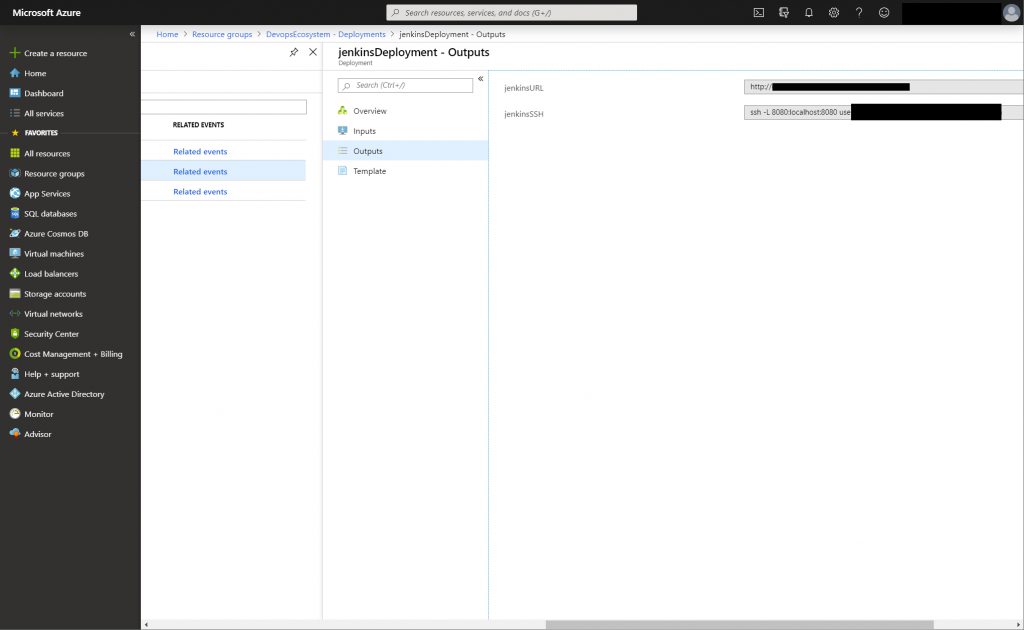
Jenkins URL and SSH access in your Azure Portal

As you cannot login as Admin using the JenkinsURL, you need to run az login within your terminal and then the JenkinsSSH command from the Outputs page of Azure. You can access Jenkins using the url http://localhost:8080 afterwards and use the admin account.
![](https://codenotary.com/hubfs/Imported_Blog_Media/jenkins_changepipeline-1024x390-1-1.png)

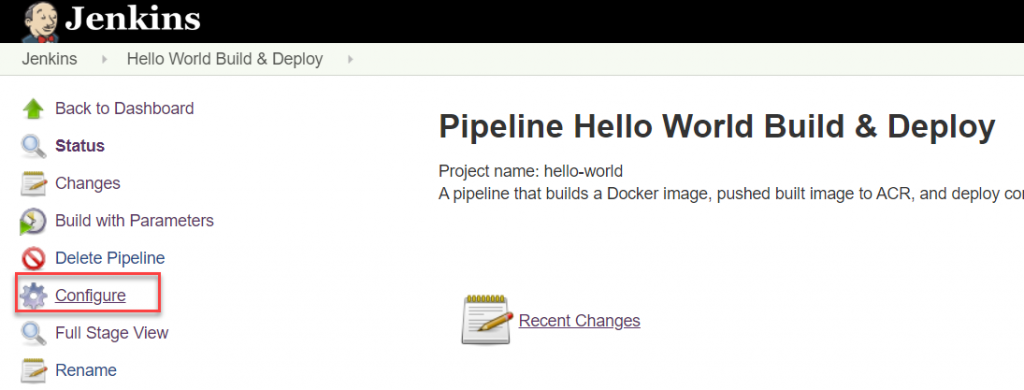
Configure your Pipeline

Click Configure of your pipeline to change the script.
![](https://codenotary.com/hubfs/Imported_Blog_Media/jenkins_pipeline-1024x630-1-1.png)

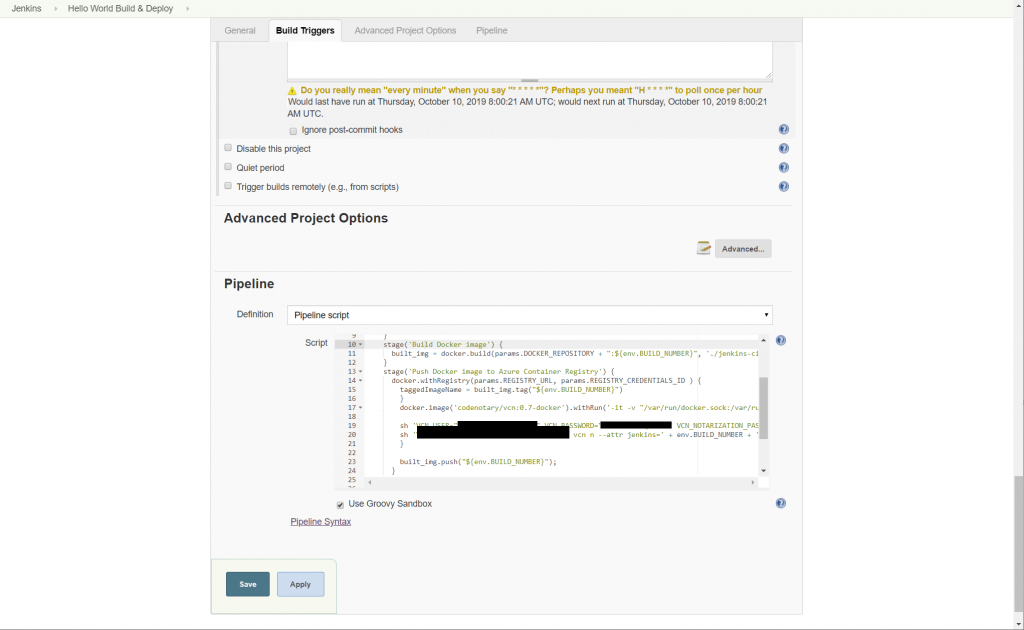
Pipeline Script

```
node {
 def built_img = ''
 def taggedImageName = ''

 stage('Checkout git repo') {
   git branch: 'master', url: params.GIT_REPO
 }
 stage('Build Docker image') {
   built_img = docker.build(params.DOCKER_REPOSITORY + ":${env.BUILD_NUMBER}", './jenkins-cicd-container')
 }
 stage('Push Docker image to Azure Container Registry') {
   docker.withRegistry(params.REGISTRY_URL, params.REGISTRY_CREDENTIALS_ID ) {
   taggedImageName = built_img.tag("${env.BUILD_NUMBER}")
 }
docker.image('Codenotary/vcn:0.7.1-docker').inside('-v "/var/run/docker.sock:/var/run/docker.sock:ro" --entrypoint ""') { c ->
   sh 'VCN_USER="user" VCN_PASSWORD="password" vcn login'
   sh 'VCN_NOTARIZATION_PASSWORD="password" vcn n --attr jenkins=' + env.BUILD_NUMBER + ' docker://' + taggedImageName
 }

 built_img.push("${env.BUILD_NUMBER}");
 }
 }
 stage('Deploy configurations to Azure Container Service (AKS)') {
 withEnv(['TAGGED_IMAGE_NAME=' + taggedImageName]) {
 acsDeploy azureCredentialsId: params.AZURE_SERVICE_PRINCIPAL_ID, configFilePaths: 'jenkins-cicd-container/kubernetes/*.yaml', containerService: params.AKS_CLUSTER_NAME + ' | AKS', dcosDockerCredentialsPath: '', enableConfigSubstitution: true, resourceGroupName: params.AKS_RESOURCE_GROUP_NAME, secretName: '', sshCredentialsId: ''
 }
 }
```

The important part to change:

```
docker.image('Codenotary/vcn:0.7.1-docker').inside('-v "/var/run/docker.sock:/var/run/docker.sock:ro" --entrypoint ""') { c ->
    sh 'VCN_USER="user" VCN_PASSWORD="password" vcn login'
    sh 'VCN_NOTARIZATION_PASSWORD="password" vcn n --attr jenkins=' + env.BUILD_NUMBER + ' docker://' + taggedImageName
  }
```

1. we use the [docker image of Codenotary](https://hub.docker.com/r/Codenotary/vcn) that contains the [vcn](https://github.com/vchain-us/vcn) command line tool
2. make sure the docker container starts with a mapped docker.sock
3. run a vcn login using your username and password (we recommend creating a service account for your jenkins at [Codenotary.io](https://www.Codenotary.io)). That way you can always differentiate between automatic notarization and manual.
4. run the notarization process for the newly generated docker image (during the Jenkins process)

## Check the notarization

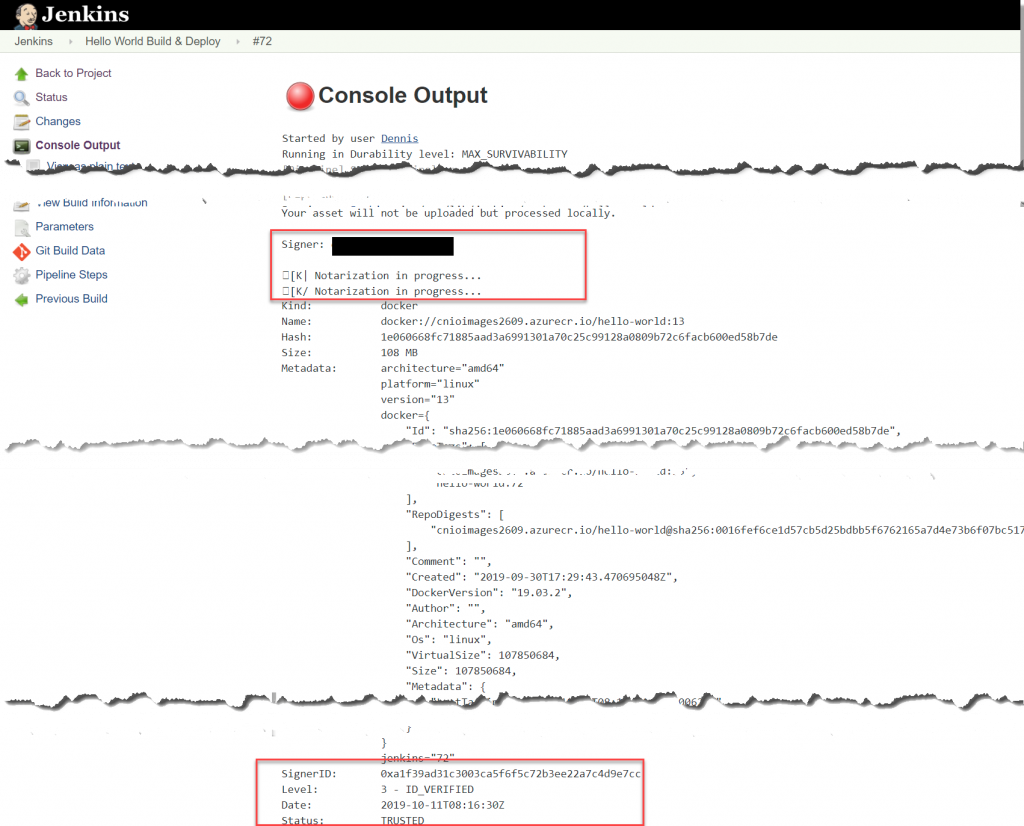
You can check the pipeline output for the successful notarization of your Jenkins build docker image.
![](https://codenotary.com/hubfs/Imported_Blog_Media/screencapture-cniojenkins-eastus-cloudapp-azure-job-hello-world-72-console-2019-10-11-18_10_57-1024x826-1-1.png)

That’s it – all of your future Jenkins built docker /images/blog, will be automatically notarized and you can authenticate them from everywhere in the world.

[![Share on twitter](https://4059529.fs1.hubspotusercontent-na1.net/hub/4059529/hubfs/01-marketplace/twitter-color.png?width=35&height=35&name=twitter-color.png)](https://twitter.com/intent/tweet?original_referer=https://codenotary.com/blog/securing-your-azure-devops-ecosystem-jenkins-and-kubernetes-aks-using-codenotary-part-1&utm_medium=social&utm_source=twitter&url=https://codenotary.com/blog/securing-your-azure-devops-ecosystem-jenkins-and-kubernetes-aks-using-codenotary-part-1&utm_medium=social&utm_source=twitter&source=tweetbutton&text=) [![Share on facebook](https://4059529.fs1.hubspotusercontent-na1.net/hub/4059529/hubfs/01-marketplace/facebook-color.png?width=35&height=35&name=facebook-color.png)](http://www.facebook.com/share.php?u=https://codenotary.com/blog/securing-your-azure-devops-ecosystem-jenkins-and-kubernetes-aks-using-codenotary-part-1&utm_medium=social&utm_source=facebook) [![Share on linkedin](https://4059529.fs1.hubspotusercontent-na1.net/hub/4059529/hubfs/01-marketplace/linkedin-color.png?width=35&height=35&name=linkedin-color.png)](http://www.linkedin.com/shareArticle?mini=true&url=https://codenotary.com/blog/securing-your-azure-devops-ecosystem-jenkins-and-kubernetes-aks-using-codenotary-part-1&utm_medium=social&utm_source=linkedin) [![Share on pinterest](https://4059529.fs1.hubspotusercontent-na1.net/hub/4059529/hubfs/pinterest.jpg?width=35&height=35&name=pinterest.jpg)](http://pinterest.com/pin/create/button/?url=https://codenotary.com/blog/securing-your-azure-devops-ecosystem-jenkins-and-kubernetes-aks-using-codenotary-part-1&utm_medium=social&utm_source=pinterest&media=)

```json
{
  "@context" : "https://schema.org",
  "@type" : "BlogPosting",
  "author" : {
    "@type" : "Person",
    "name" : "Dennis",
    "url" : "https://codenotary.com/blog/author/dennis"
  },
  "dateModified" : "2023-02-14T21:23:38.078Z",
  "datePublished" : "2019-10-11T21:41:45.000Z",
  "headline" : "securing-your-azure-devops-ecosystem-jenkins-and-kubernetes-aks-using-Codenotary-part-1 - Codenotary",
  "image" : [ "https://codenotary.com/hubfs/Imported_Blog_Media/Blog-Default-MnL-Feb-10-2023-08-07-17-2504-AM.jpg" ],
  "mainEntityOfPage" : {
    "@id" : "https://codenotary.com/blog/securing-your-azure-devops-ecosystem-jenkins-and-kubernetes-aks-using-codenotary-part-1",
    "@type" : "WebPage"
  },
  "publisher" : {
    "@type" : "Organization",
    "logo" : {
      "@type" : "ImageObject",
      "url" : "https://codenotary.com/hubfs/logo-light.svg"
    },
    "name" : "Codenotary, Inc."
  }
}
```

```json
{
  "@context" : "http://schema.org",
  "@type" : "Article",
  "author" : {
    "@type" : "Person",
    "name" : [ "Dennis" ],
    "url" : "https://codenotary.com/blog/author/dennis"
  },
  "datePublished" : "2019-10-11T21:41:45+0000",
  "description" : "MONITOR & MANAGE THE RISK EXPOSURE OF YOUR APPLICATIONS WITH TRUESBOM®",
  "headline" : "securing-your-azure-devops-ecosystem-jenkins-and-kubernetes-aks-using-Codenotary-part-1",
  "image" : "https://23873599.fs1.hubspotusercontent-na1.net/hubfs/23873599/Imported_Blog_Media/Blog-Default-MnL-Feb-10-2023-08-07-17-2504-AM.jpg",
  "publisher" : {
    "@type" : "Organization",
    "logo" : {
      "@type" : "ImageObject",
      "url" : "https://cdn2.hubspot.net/hubfs/23873599/logo-light.svg"
    },
    "name" : ""
  },
  "url" : "https://codenotary.com/blog/securing-your-azure-devops-ecosystem-jenkins-and-kubernetes-aks-using-codenotary-part-1"
}
```