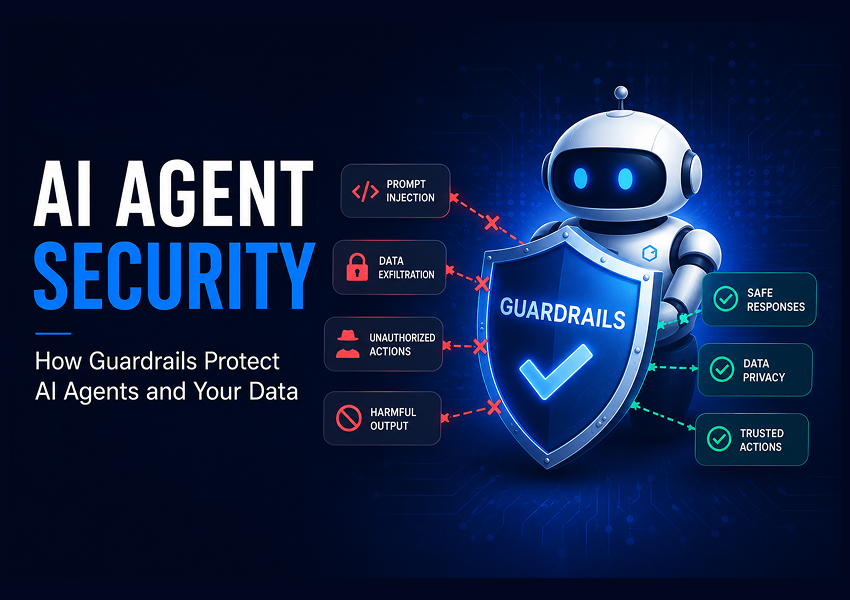
AI agent security is the practice of stopping autonomous agents from doing things they shouldn’t: reading secrets, executing dangerous commands, leaking API keys, following injected instructions, or calling tools they haven’t been governed to call. None of those failure modes are catchable by the AppSec stack you already own. This post walks through the five exposure surfaces unique to AI agents and how Codenotary AgentMon instruments each one.
In a normal application, the question “did anything sensitive happen here?” is answerable. There’s an audit log. There’s a firewall rule that either let the traffic through or didn’t. There’s a user, and the user did something, and the something is auditable.
In an agent, none of that is automatic. The agent decides what to do at runtime. It reads files. It calls tools. It pipes outputs of one tool into another. Most of the security boundary lives in the agent’s prompt, and the prompt is text.
If you’ve been around AI agents for more than a quarter, you already know what we’re describing. This is part two of our four-part series on AgentMon, and we’re going to talk about the kind of AI agent security that only matters for agents, the kind that’s invisible to your existing AppSec stack and that almost nobody had a name for two years ago.
The five AI agent security surfaces nobody likes to think about#
When we built AgentMon’s Security Lens, we sat down and made a list of the things that go wrong inside a running agent that wouldn’t be caught by any of the security tools we’d already deployed. The list maps almost directly onto the OWASP Top 10 for Large Language Model Applications:
- Prompt injection: instructions hidden in retrieved content, web pages, file contents, tool outputs, or other agents’ messages, designed to redirect the agent into doing something the operator didn’t ask for. (OWASP LLM01.)
- Dangerous command execution: the agent decides, mid-reasoning, to run
rm -rf,sudo, orcurl | sh. (LLM02 / insecure output handling.) - Sensitive file access: the agent reads
.env,id_rsa,~/.ssh/, credentials files, certificates. - Secret leakage: the agent’s I/O contains an API key, a
sk-*,ghp_*,AKIA*, or a PEM-encoded private key. Maybe in a prompt. Maybe in a response. Maybe in a log line that got forwarded somewhere. (LLM06.) - Ungoverned MCP servers: somebody connected the fleet to a Model Context Protocol server nobody has reviewed, signed off on, or even noticed. (LLM05 / supply chain.)
Every one of those is a real AI agent security failure mode we have either seen ourselves or had reported back to us by customers. Every one of those is exactly zero percent visible to a traditional SIEM unless you build the detection yourself. AgentMon ships them on day one.
Where it all lives: the AgentMon Guardrails dashboard#
Every one of those five AI agent security surfaces gets a counter on the Guardrails page:
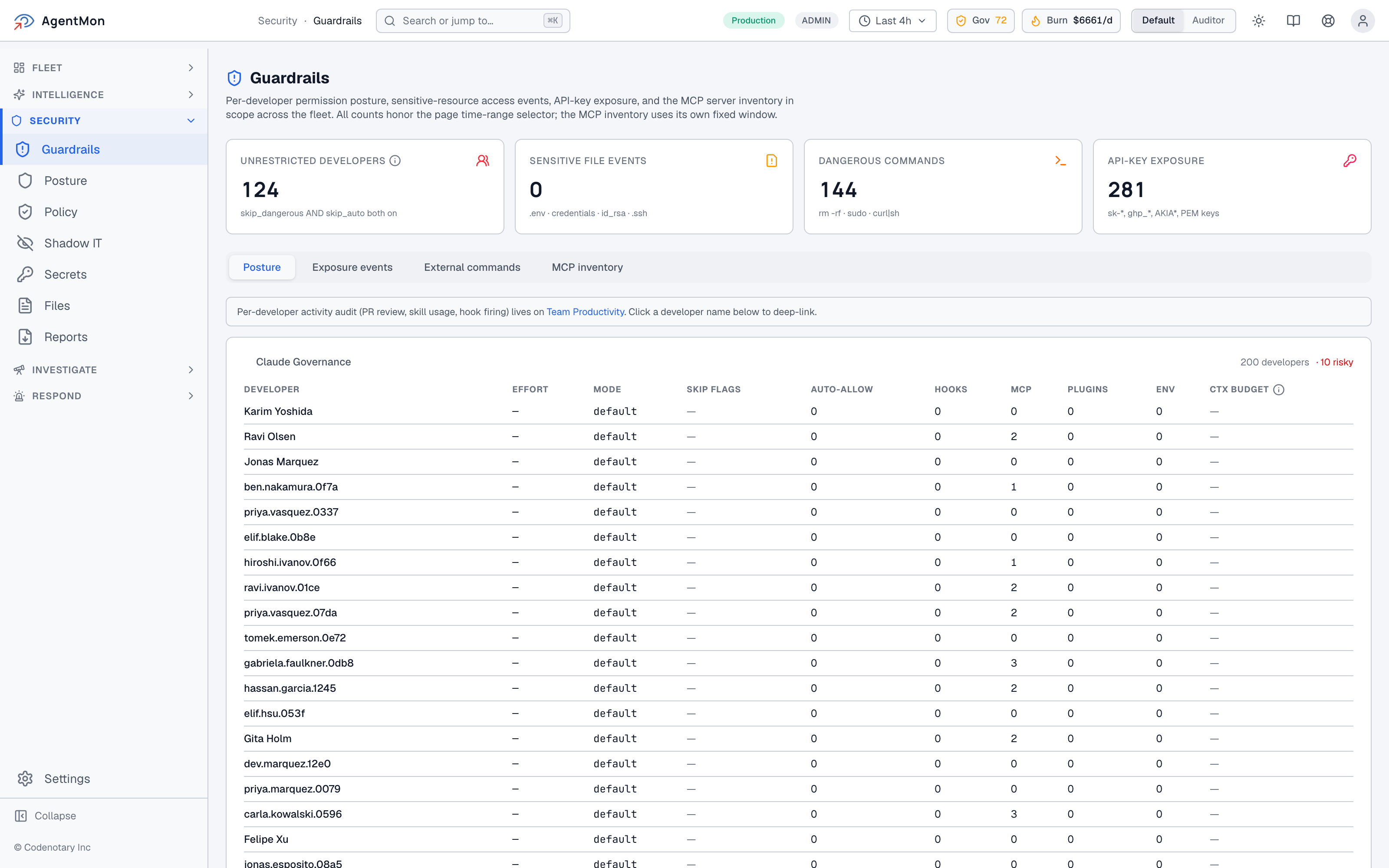
In the screenshot above, the counters are all at zero because amon-test is a synthetic-load environment, but the value is in the taxonomy. We are not handing you a wall of severity-3 alerts and asking you to make sense of them. We are saying: here are four things you actually need to count, here is the exact pattern definition under each counter, and here is the click-through to the events themselves.
Tab over to “Exposure events” and you get the per-category event stream:
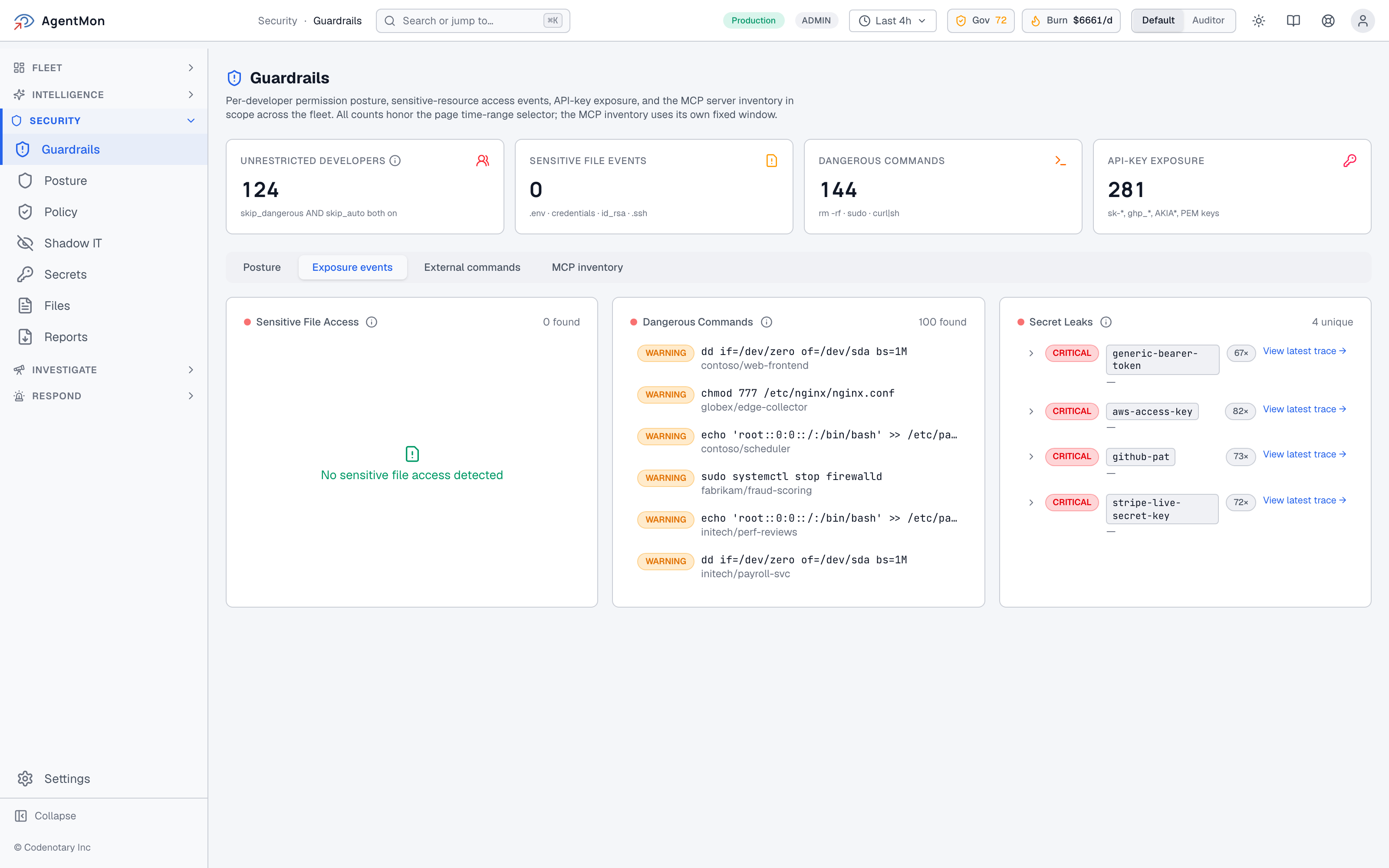
This is what an empty state should look like. Three categories, three counters, three “we are actively watching for this and have not seen it” confirmations. The negative result is itself the value: a CISO asking “are we leaking secrets from agents?” wants to be told yes or no, not handed a query language.
The “External commands” tab does the same thing for the per-call command stream, and “MCP inventory”, possibly our favorite, answers “what MCP servers are the developers in this fleet using right now?”
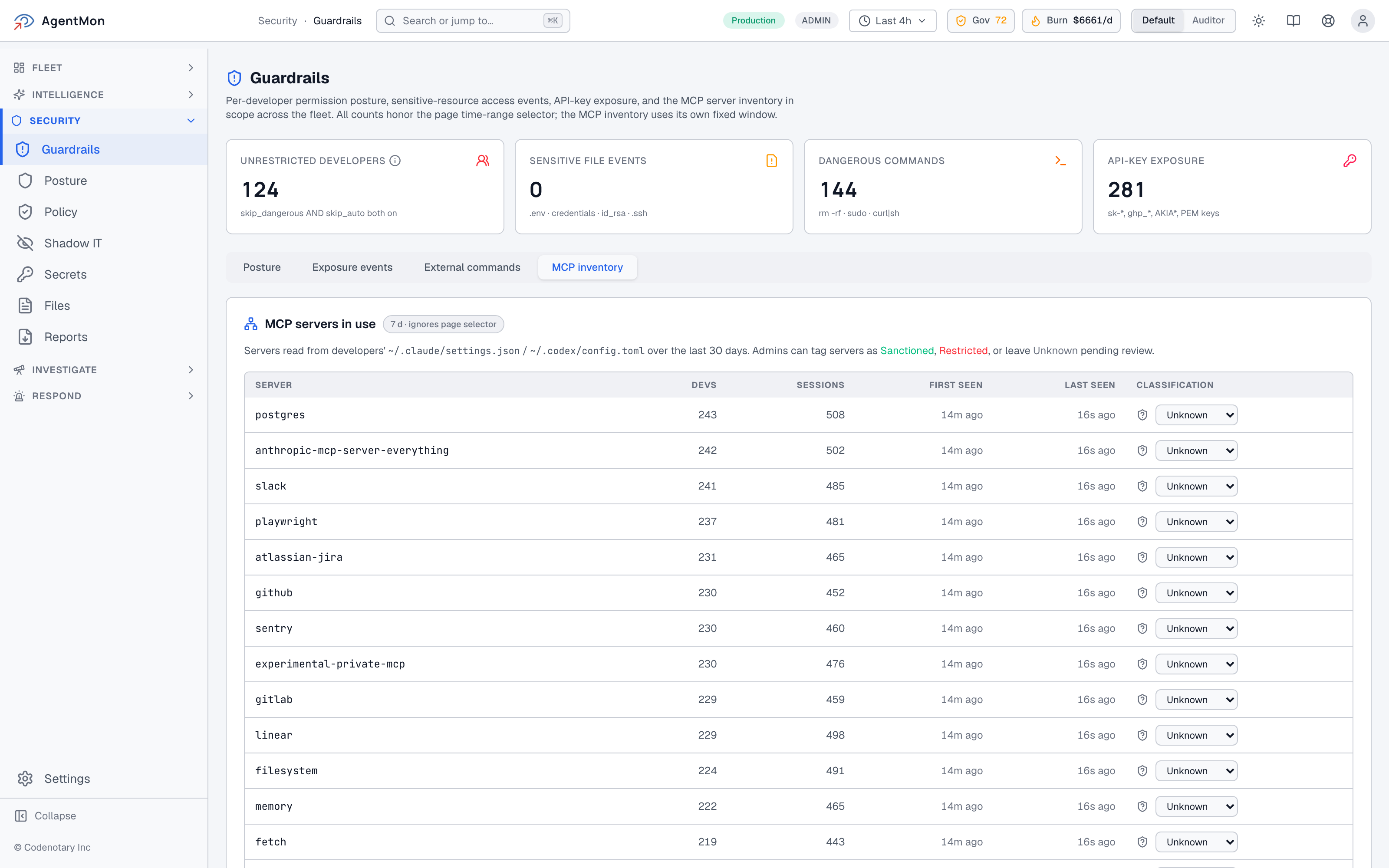
You discover MCP servers the only way that scales: by reading what developers actually have configured in their local ~/.claude/settings.json and ~/.codex/config.toml, over a rolling 30-day window, and tagging each one Sanctioned, Restricted, or Unknown-pending-review. The whole point is that you don’t have to ask anybody. The platform observes the configurations as they sit on real laptops and presents you a fleet-wide picture.
The unified Security view, for when something does fire#
When something does light up, the Security Posture page is the one place to triage from. It’s deliberately laid out the same as the Command Center’s Security Lens (same severity vocabulary, same color language) so muscle memory carries across views:
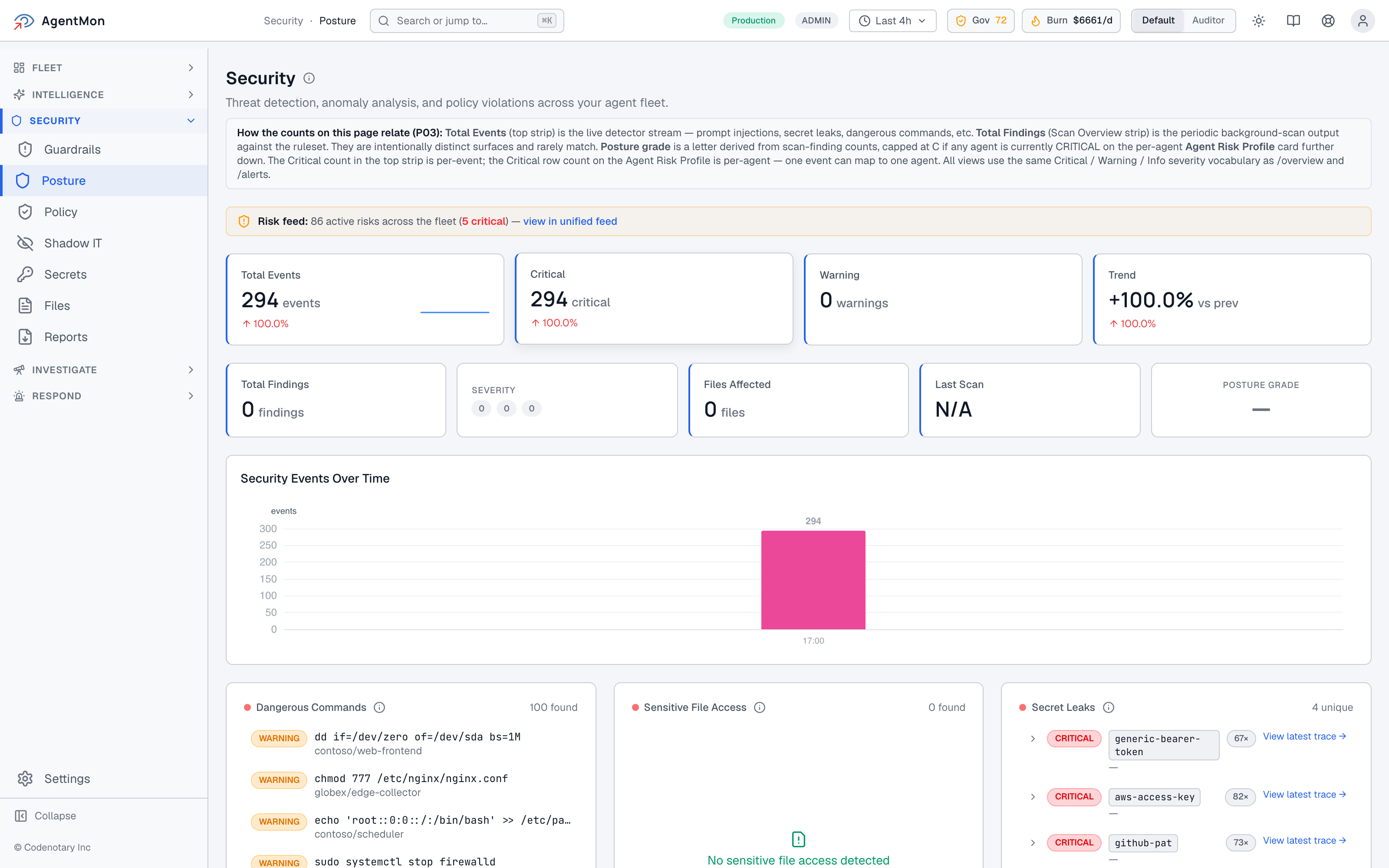
A note on something subtle that lives on this page. The header note on the page explains that the Total Events counter (the live detector stream) and the Total Findings counter (the periodic background scan over the ruleset) are intentionally distinct surfaces, and they rarely match. That distinction sounds nerdy but it matters: it lets a real-time responder and a batch-mode auditor look at the same page and each find the number they came for.
The same vocabulary continues into the Agent Risk Profile card on the right. The detector strip on top is per-event. The Agent Risk Profile is per-agent. One event can map to one agent. The fleet sees five critical events; the profile says one agent in the fleet is in a critical state. Both are true.
This is the kind of detail that you only get right if you’ve sat with security teams trying to write incident reports and discovered that “we had 14 dangerous-command events” and “we had 3 agents misbehaving” are both important numbers and they have to be reported separately or somebody will misread one of them.
Soft-launching AI agent security policy#
The Security Lens shows you what’s happening. The Policy engine is how you stop it from happening. We covered the dashboard for this in the Risk post, but it bears repeating in a security context: AgentMon’s policy decisions ship in two modes: simulated against the last 30 days of trace data, and enforced in the live PreToolUse hook.
That dual mode is the whole reason policy gets adopted instead of disabled. A starter rule like “deny if the tool is Bash and the command contains curl | sh” is the kind of thing that, if you ship it in enforce mode without simulating it first, is going to break a developer’s workflow at some unfortunate moment. With simulation, you ship the rule, watch the would-fire counter for a week, and only then promote it. The friction is gone. The audit trail is preserved either way.
Auditor mode is a real thing#
Up in the corner of every screen there’s a toggle: Default / Auditor. Flip it and the entire UI re-skins to the columns and counters an auditor cares about: immutable record, no-redaction view, tamper-evident timestamps, the rules you ran against the data, who acknowledged what alert and when. The Auditor view is not a different product; it is the same data, projected to a different audience.
This matters in regulated industries. Codenotary’s posture on the software supply chain has always been that compliance is downstream of immutable, observable records. The same posture extends now to AI agent security: every agent run, every tool call, every external service interaction, recorded and searchable.
What AI agent security means in AgentMon’s vocabulary#
The Security Lens in AgentMon is the answer to: for every prompt, response, tool call, and file operation in the fleet right now, would I be able to tell my CISO and my external auditor (separately, in the language each of them needs) that nothing dangerous happened, and prove it?
Prompt injection detection, dangerous command flagging, sensitive file access tracking, automatic secret redaction, MCP inventory, Rego-evaluated PreToolUse policy in simulation and enforcement modes, an Auditor projection of every screen: this is what it looks like when the AI agent security model catches up to the way agents actually work.
Your agents will eventually try to do something they shouldn’t. The only question is whether you’re going to see it the same minute it happens or three weeks later from somebody else’s incident report.
Frequently asked questions about AI agent security#
What is AI agent security?
AI agent security is the set of practices and tooling that prevent autonomous agents from doing harm: leaking secrets, executing dangerous commands, following malicious instructions hidden in retrieved content, or interacting with tools they shouldn’t. It’s distinct from application security because the threats live at runtime in the agent’s decision-making, not in the code.
How does AgentMon detect prompt injection?
AgentMon scores every inbound prompt, including content the agent retrieves from external sources or other agents, against a set of patterns drawn from the OWASP Top 10 for LLM Applications. High-score events surface on the Prompt Injection panel of the Security Posture page and roll into the per-agent risk profile.
How does AgentMon handle secrets in agent telemetry?
API keys, tokens, and other secrets in agent I/O are automatically redacted before telemetry is stored. The detection runs on patterns (sk-, ghp_, AKIA*, PEM keys) plus heuristics for high-entropy strings. Secret-leak events still show up as findings, you just don’t have to worry about the secret being persisted in cleartext anywhere.
Can AgentMon block dangerous commands before they execute?
Yes: the Rego-based PreToolUse policy engine evaluates tool calls before they run. Rules can ALLOW, ASK (require user confirmation), or DENY. You can ship rules in simulation mode first to see what they would have blocked over the last 30 days, then promote to enforcement when you’re confident.
What’s an MCP inventory and why does it matter for AI agent security?
Model Context Protocol servers let agents call external tools, but each one is a new attack surface. AgentMon’s MCP inventory passively reads each developer’s local config on a 30-day window and surfaces every MCP server in use across the fleet, so admins can tag each one Sanctioned, Restricted, or Unknown-pending-review.
Next in the series: AI Agent Performance Monitoring with OpenTelemetry. We’ll talk about the performance failure modes unique to AI agents (long reasoning chains, backtracks, slow tool calls) and how the Performance Lens, distributed tracing, and the Reasoning Explorer make them debuggable.
Start with AgentMon: free · See the product · Read part 1: AI Agent Risk Monitoring