AgentMon Start puts AI agent monitoring on the machine where your agents run: your laptop or your desktop. It's a desktop app for Windows, macOS and Linux. It shows what every coding agent on that machine costs, which tools it ran, where it failed and what it touched. Plans start at $15 per user per month, and the first three devices are free for six months.
We announced AgentMon Start as the small- and mid-sized edition of AgentMon. It covers the same four jobs as the enterprise platform: cost, security, incident investigation and governance. It doesn't need a security team, a cluster or a cloud tenant. As our CEO Moshe Bar put it: "If you have agents operating inside your company, somebody needs to be watching them." For a solo developer, that somebody is you. For a team of five, it's usually whoever gets the bill.
This post shows what the app looks like and what it gives you, first as a solo developer and then as a team.
Tracking agent activity and costs
Coding agents now run shell commands, edit files and call other tools for hours on end. Most developers use more than one of them: Claude Code in the terminal, Codex for a second opinion, Cursor or Copilot in the editor. Each one keeps its own logs in its own format, so nobody gets one view of all of them.
That leaves questions most people can't answer today:
- What did I spend yesterday, and on which session?
- Which tool calls failed and got retried, so I paid for them twice?
- Did a secret end up in a prompt, or did a file I opened try to inject instructions?
- Which agents is my team running, and are any of them unmanaged?
Enterprise observability stacks can answer these. They're also built for platform teams with a cluster and a budget to match. AgentMon Start answers the same questions with an install that takes a few minutes.
How it works: everything stays on your machine
AgentMon Start reads the session logs your agents already write. It supports 16+ agents, harnesses and LLMs, including Claude Code, Claude Desktop, Codex, GitHub Copilot, Cursor, Gemini CLI and Goose. You don't add an SDK, set up a proxy or change how you work.
The installer puts three pieces on your machine, and none of them need administrator rights:
- The collector (amon) parses agent logs and turns them into compact snapshots: token counts, costs, tool calls, errors and security findings.
- The Local Server stores the snapshots in a local SQLite database and analyzes them. It only listens on 127.0.0.1, and no setting can change that. It starts at login and keeps collecting after you close the window.
- The window is the dashboard. It's only a view, so closing it stops nothing.
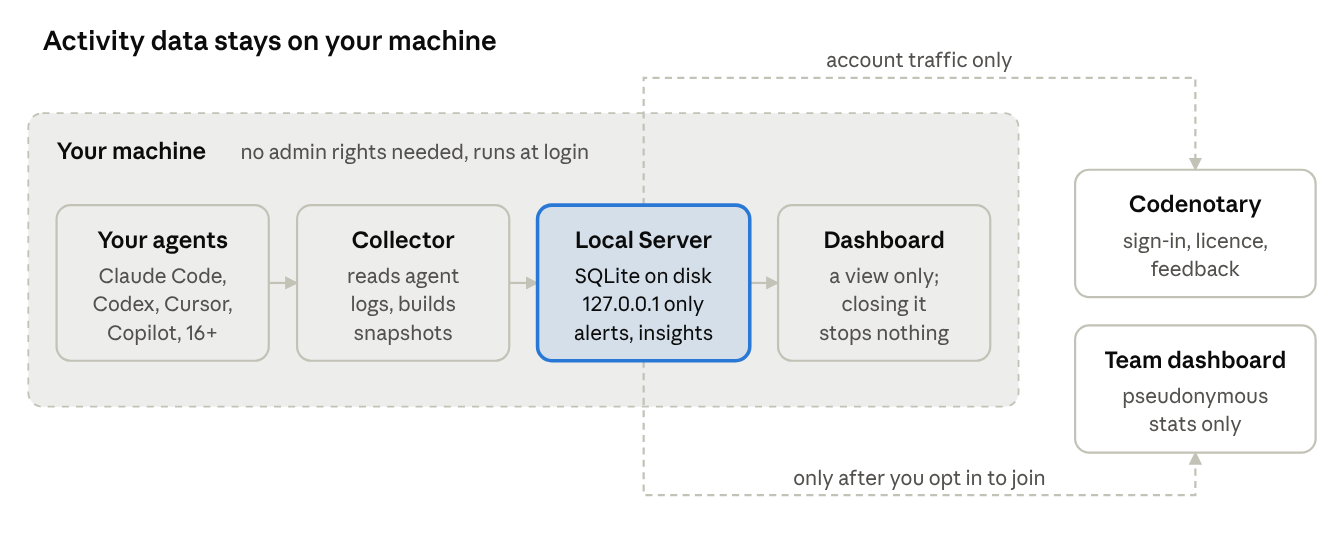
AgentMon Start architecture, three local pieces, two optional remotes
Your activity data stays on your machine. The app only talks to Codenotary for sign-in, license checks and feedback you choose to send. If your team later wants a shared view, joining an organization is an explicit step, and the app shows you exactly what will be uploaded before anything leaves.
On top of the data, AgentMon Start runs three kinds of analysis:
- Alerts check every 60 seconds: daily cost thresholds, security findings, and machines that stopped reporting. Licensed plans add burn-rate spikes, error spikes, long-running or hung sessions, and Shadow AI signals. Alerts can go to Slack or any webhook.
- Recommendations look back over 30 days for cost and reliability problems, such as low cache use, retry storms, wasted sessions and bloated prompts. Each comes with the evidence and an estimated saving.
- Security checks flag secrets in prompts, prompt-injection attempts and dangerous shell commands.
A tour of the dashboard
Overview: what did my agents cost today?
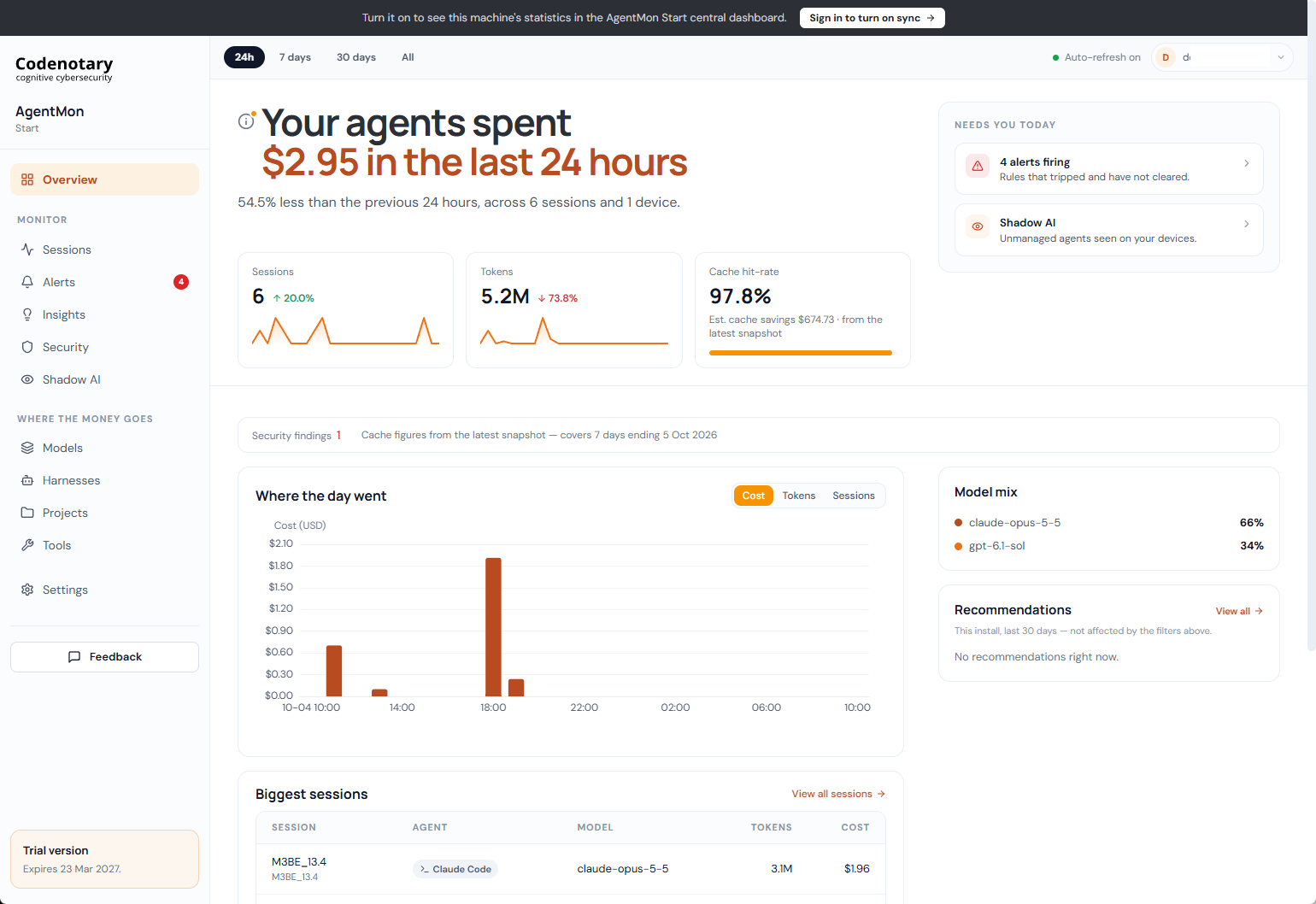
The Overview answers the first question in one sentence: your agents spent $2.95 in the last 24 hours, 54.5% less than the day before, across 6 sessions. Below that are tiles for sessions, tokens and cache hit rate. A 97.8% cache hit rate here saved an estimated $674 over the week. The hourly chart shows when the money went, the model mix shows which models it went to, and the "Needs you today" panel lists firing alerts and Shadow AI signals. You can switch between 24 hours, 7 days, 30 days and all time.
Sessions: what did each agent do?
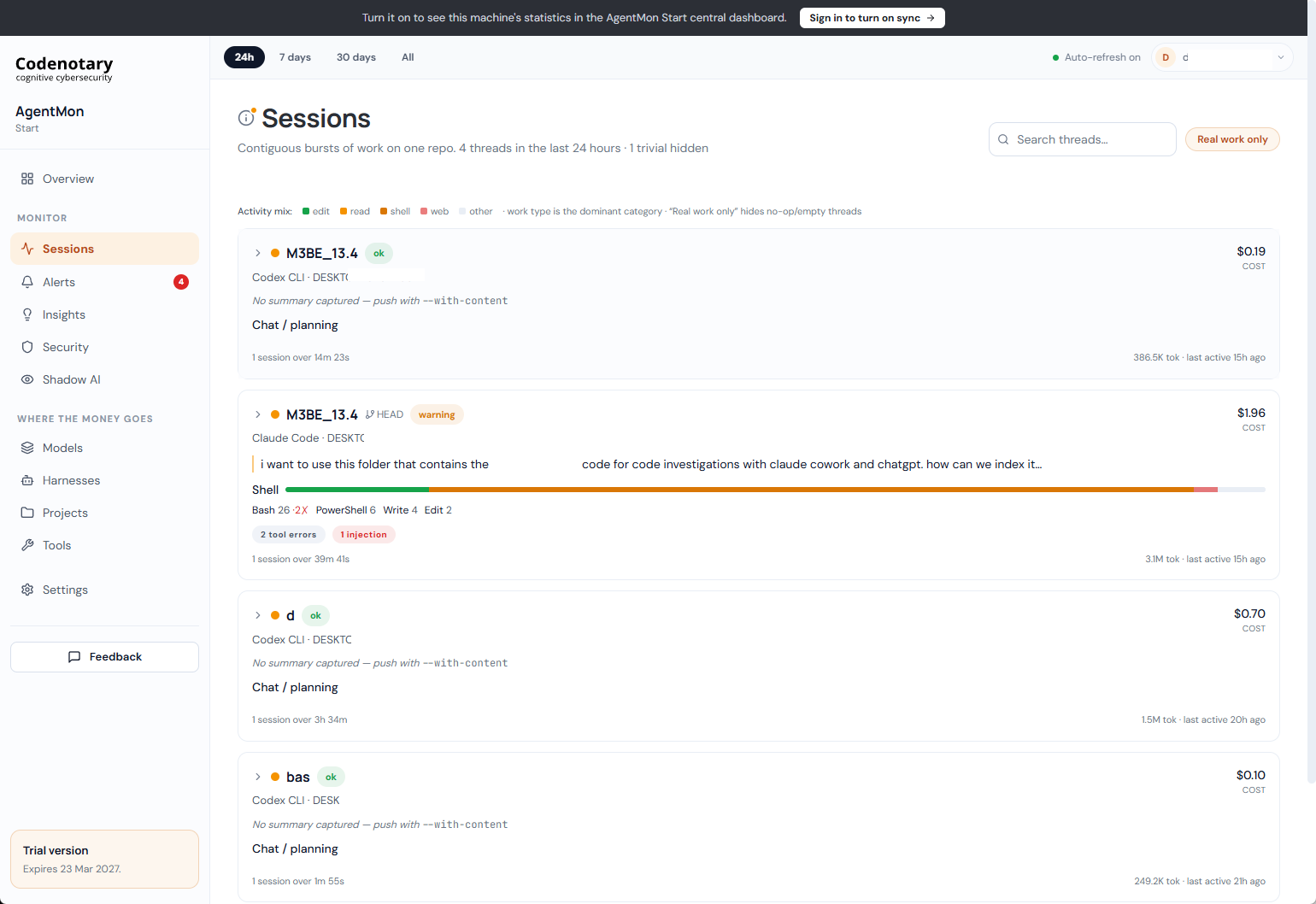
Sessions groups agent activity into threads: continuous bursts of work on one repository. Each thread shows the agent (Claude Code, Codex CLI and so on), the cost, the tokens used and how the work split between editing, reading, shell commands and web access. Problems are badged where you'll see them. In this example, a $1.96 Claude Code thread ran 26 Bash calls, 2 of which failed, and was flagged for one prompt injection. "Real work only" hides empty and no-op threads.
Tools: what did the agents run, and what failed?
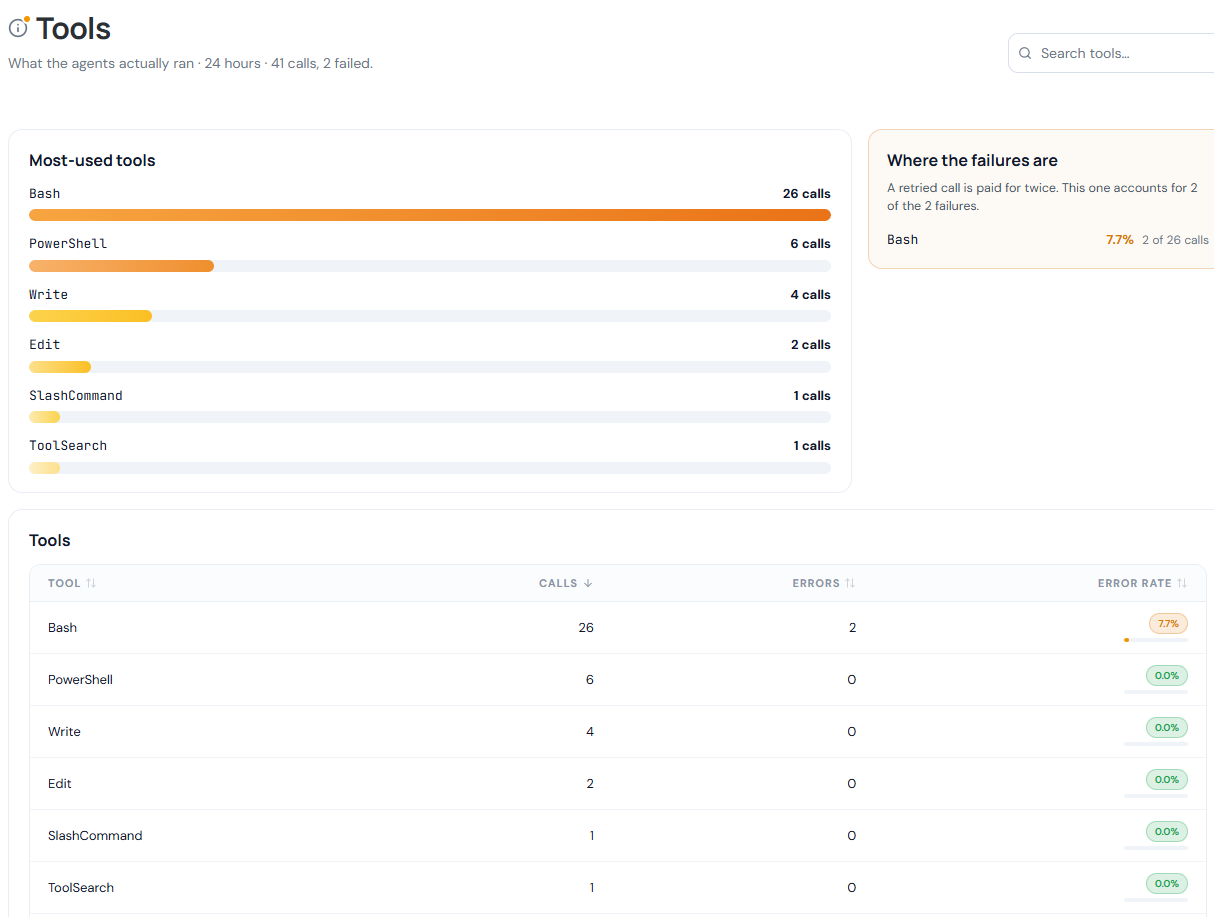
Tools lists every tool your agents called and how often each one failed. The "Where the failures are" panel points at the cost behind the errors: a retried call is paid for twice. Here, both of the day's 2 failures came from Bash.
Traces: review the session step by step
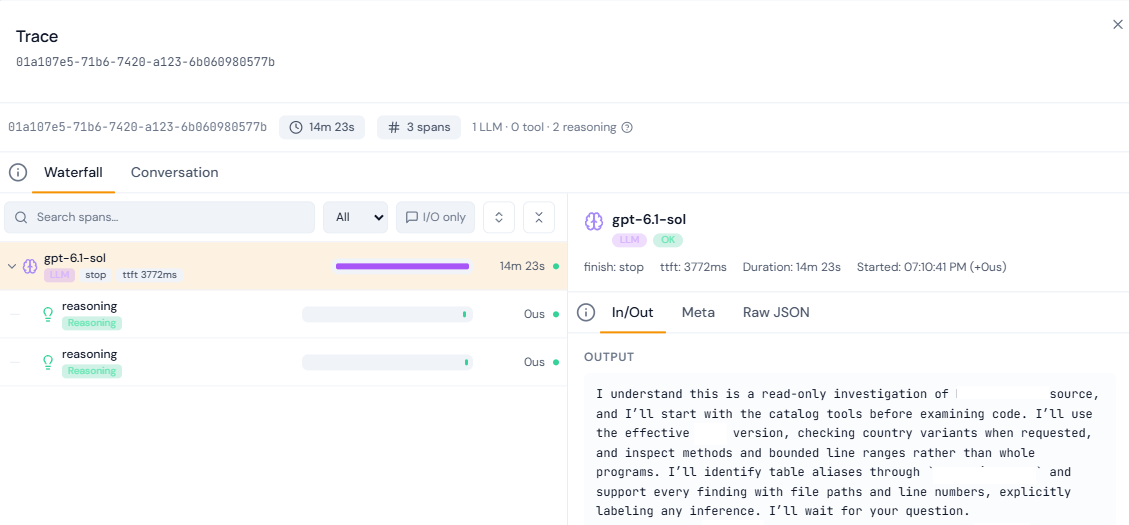
When something unexpected happens, open the session's trace. The waterfall shows every LLM call, tool call and reasoning step, with timings. The side panel shows the model's input and output, its metadata and the raw JSON. This view helps you review what happened during the session.
For solo developers: know what you're paying for, and what your agents touched
If you pay for your own AI usage or run several agents side by side, AgentMon Start keeps a local record of your agents' activity.
- Agent activity. Claude Code, Codex, Cursor and Copilot show up in one dashboard instead of four log folders in four formats.
- Session costs. See which session, model or project the money went to, set a daily cost alert, and let recommendations point out savings like better cache use or fewer retries.
- Security warnings. Get a warning when a secret lands in a prompt, a file tries to inject instructions, or an agent runs a dangerous command, while you can still do something about it.
- Session traces. When an agent loops, stalls or does something odd, the trace shows each step it took and what the model said.
- Local storage. Prompts and code stay in a local database on your own machine. There's no cloud account holding your sessions, and nothing for you to host.
- Background collection. The installer registers a background service, so collection survives closing the window, logging out and rebooting.
Monitoring for teams
Once several people run agents, the questions change from "what did I spend?" to "what are we running, and is it under control?" Teams can connect their devices to a shared dashboard.
- Team dashboard. Each developer's machine can join your organization and show up in the central AgentMon Start dashboard. Joining is opt-in for each device. Before anything leaves, the app shows what will be uploaded, and synced data is pseudonymous.
- Spend per person, project and model. See how AI spending is distributed across people, projects and models. Burn-rate alerts catch a runaway agent within the hour, not at the end of the month.
- Shadow AI detection. See ungoverned or policy-blocked agent types, sessions nobody can attribute, zombie and long-running sessions, and unusual sub-agent spawning, all in one place.
- Slack and webhook alerts. Send firing and resolved alerts to a Slack channel or a webhook, so nobody has to watch a dashboard.
- Roles and audit trails. Admins manage users and settings, and viewers get read-only access to every analytics page. That's enough for a team lead, a security reviewer or an auditor.
- Hosting and pricing. There are no servers or clusters to run. Plans are priced per user, starting at $15 per user per month.
Getting started
- Create your free Codenotary account and download AgentMon Start for Windows, macOS or Linux.
- Install it and sign in with that account. The first sign-in becomes the admin.
- Keep working. The collector picks up your agents' existing sessions, and the Overview fills in on its own.
Your first three devices are free for six months, and paid plans start at $15 per user per month.


