A lead arriving in a CRM, a customer email that needs an answer, and a Linux server that has stopped serving traffic can all start an AI workflow. Each demands a different kind of ownership. The lead needs a reliable handoff. The email may need context and a draft. The server needs a named target, controlled access, an investigation, a decision about changes, and proof that the service recovered.
The useful question for 2026 is what continuing work a system can take on. This guide follows six platforms through the jobs they are built to handle: Codenotary AgentX, Resolve AI, n8n, Zapier, AgentX.so, and LangGraph. The roles range from Linux fleet operations and on-call response to app handoffs and custom agent applications.
Start with the Work
An AI step inside an existing process can save time. Owning a workload asks more of a system: it needs a trigger, an object to act on, access to the right context, permission to take defined actions, and a way to tell whether the job is finished. A customer record, a production incident, and a Linux host each bring a different set of rules.
This is why the same organization may run several kinds of AI workflow. Sales can automate a handoff without learning infrastructure commands. Engineers can build a specialist agent without turning it into an on-call system. An operations team can assign recurring server work to an agent while retaining approval over risky changes. The following sections show where each platform has a useful role.
Set the Boundaries Before Handing Work Over
First, name the object the workflow acts on. Is it a lead, a support request, a document, or a host? Then define a successful result. "Run AI on alerts" is too loose to operate. "Investigate every failed service check, propose a repair, and record the result against the affected host" gives the team something it can review.
Next, decide which steps can run without approval. Reading a deployment and restarting it carry different risks. Finally, decide how the result will be checked. A completed tool call is not the same as a healthy service or a reconciled record. These questions expose the difference between a useful AI feature and a workload the system can own over time.
Codenotary AgentX: Recurring Linux Fleet Work
Use it when the work begins and ends on Linux systems. Patching, baseline checks, service health, vulnerability response, configuration drift, and incident investigation recur across hosts. An operations team needs those actions tied to a system and an agent that can reach it, with a record of what happened. Codenotary AgentX organizes the work around systems, findings, jobs, and actions.
Its Ops and DevOps harness includes hundreds of registered operational tasks. Known job types can take deterministic routes through typed tasks and bundles; work outside those routes can use the agent execution path. Risk and approval controls still govern what may run. Optional automatic remediation creates jobs from scanner findings when configured; that is an operating choice, not a blanket promise that every finding is fixed without review.
The system is the unit of work
The captured system page shows the host, its assigned agents, findings, recent actions, disk use, and backup status together. The "none" backup value is a reason to check coverage. It is not evidence that a recovery path exists. This is what a recurring fleet workload needs: a named target and a history the next action can use.
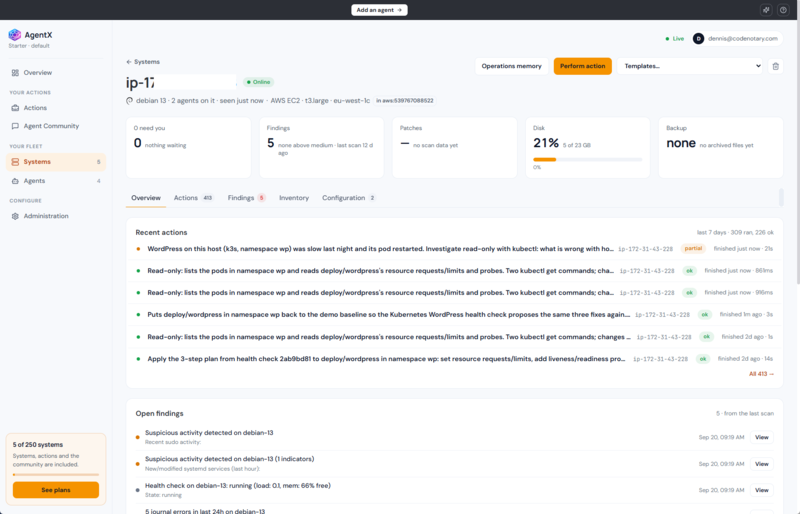
A Linux host page links current state, findings, and recent actions. Values shown belong to this captured example.
That host record supports work that repeats. A new system can receive a baseline assessment. Service and security checks can run on a schedule, while a finding or drift event can create a response job. A patch cycle can use the same target and approval context, then record whether the expected service state returned. These are separate tasks, but the team should not have to reconstruct the host, its history, and its access policy for every one.
Consider the range of work behind a single fleet dashboard. One host needs a package update; another has a service that fails after a configuration change; a third has an unexpected open port. Each case needs a different investigation, but the operator should be able to see which system was affected, what the agent inspected, what it proposed, and whether the final state passed a check. That continuity is more valuable than a one-off answer to an alert.
The same pattern covers less urgent jobs. Teams can schedule inventory and health checks, look for drift from a known configuration, check backup coverage, and prepare maintenance work before an outage. Some tasks can finish under a defined policy. Others should end with a plan for a person to approve. The dividing line belongs in the operating rules, not in an improvised prompt written during an incident.
An investigation can stay read only
The next screenshot follows a slow WordPress workload on Kubernetes. The operator requested a read-only investigation. The action detail names the agent and target, shows the instruction, and exposes the running kubectl step and live log. A pod restart, failed probe, or resource limit could explain the slowdown, but the screenshot shows only the inspection in progress. It does not establish a root cause.
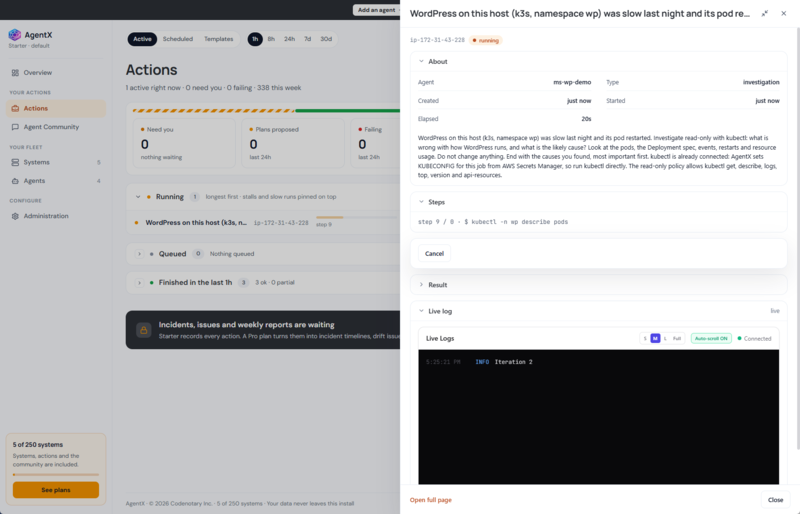
The running WordPress investigation shows its read-only instruction, current kubectl step, and live log.
A proposed change remains a decision
In the following Actions view, the agent has proposed three steps. The plan is explicitly marked as not applied. That state matters: a useful system can gather evidence and recommend work while leaving a potentially disruptive change for review. The captured sequence ends here. It does not show that the plan was applied or that WordPress recovered.
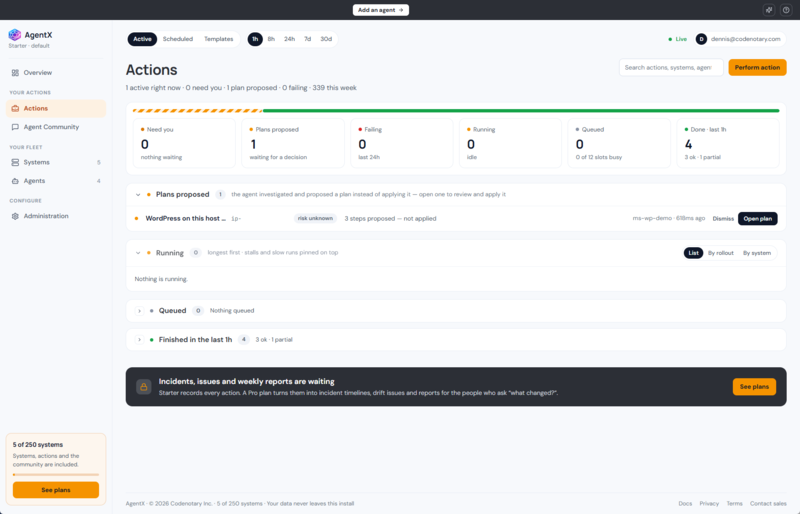
A three-step WordPress plan awaits review and has not been applied.
This is the role of a dedicated fleet operations solution. The ongoing workload has systems, targets, operational tools, policies, and result history. An app workflow can handle tickets and notifications around it, while the server work has a clear owner.
Resolve AI: On-Call and Production Incidents
Use Resolve AI when the workload starts with production signals: an alert, a failed deploy, a service regression, or an incident that crosses several systems. Its AI SRE agents investigate alerts, gather evidence from observability and infrastructure tools, help mitigate incidents, and escalate when engineers need to decide. Resolve also offers background agents for scheduled or event-triggered operational tasks such as deployment checks, resource reports, and drift detection.
An on-call team can give Resolve the first pass on every alert. The agent can gather relevant signals, assess impact, document its reasoning, and bring an engineer into the loop for a consequential decision. That changes the start of a shift: the person on call sees investigated work with evidence and next steps, not a queue of raw pages.
Resolve also reaches beyond individual alerts. A team can schedule a deployment health check, watch for a regression after release, or prepare a daily operational report. Before assigning those jobs, define the sources the agent can read, the actions it may take, the approval path, and the evidence the service owner expects to see afterward.
n8n: Technical Workflows Across Apps and APIs
Use n8n when a team wants to design a process that crosses services and needs to see each step. A technical team might take an alert, look up an owner, create a ticket, request approval, and post an update when the incident changes state. n8n also supports AI agents, tools, memory, models, and MCP connections inside its workflow builder. It is a practical option when those pieces need to be combined with conventional workflow logic.
A useful n8n workflow has clear inputs and handoffs. For example, an alert can open an incident record, enrich it with service ownership, ask for a decision, and keep stakeholders updated as the status changes. The team can see where a run stopped and repair that step. Domain-specific actions still need explicit access, rules, and checks supplied by the team that owns them.
Zapier: Business App Handoffs
Use Zapier when the job is triggered by activity in business software and the team wants to ship the automation quickly. Lead routing, support triage, customer updates, and record synchronization fit well. In 2026, Zapier is moving its standalone Agents capabilities into AI by Zapier steps inside Zaps. The AI step can use tools and sit among ordinary triggers, filters, paths, approvals, and run history.
A sales team might qualify an inbound request, route it to the right owner, draft a follow-up, and update the CRM. A support team might classify a ticket, prepare a reply, and ask a person to approve it. These are jobs with recognizable starts and finishes, making them suitable for a business app workflow with an AI step inside it.
AgentX.so: Multipurpose Agent Teams
Use AgentX.so when the main job is to build, evaluate, and deploy agents for different business processes. Its platform supports orchestrated agent teams, tools and memory, human handoff, evaluation, tracing, and deployment to channels such as an API or Slack. Its MCP hub helps connect agents to external capabilities. Document processing, customer operations, and client onboarding are examples the company presents.
The platform is useful when an organization plans several agent applications with different jobs. A document agent can extract and check facts before a handoff; a customer operations agent can gather context and prepare a response. Each application still needs its own boundaries: what the agent may read, which tools it may call, when a person takes over, and how the result is checked.
LangGraph: Custom Agent Applications in Code
Use LangGraph when engineers need fine control over a long-running agent application. It is a low-level orchestration framework and runtime for stateful agents. Developers can mix deterministic steps with model decisions, persist state, pause for human review, and resume later. A custom support agent that classifies mail, searches internal knowledge, drafts a response, and escalates difficult cases is a suitable example.
The application team defines the graph, integrations, prompts, deployment, security controls, and success checks. This suits work whose process is distinctive enough to warrant code: a research assistant with several review stages, for example, or an internal support workflow with strict escalation rules and durable state.
Give Each System a Clear Part of the Job
A workflow can cross systems without giving every system the same authority. Suppose a service health check fails on a Linux host. Codenotary AgentX can investigate the named system, keep the action history, and present a proposed repair for review. n8n can update the incident ticket and notify the on-call channel. Zapier can handle a customer-facing status handoff. The app workflows can do their part without command access to the host.
In a broader production incident, Resolve AI can investigate signals from telemetry, deployment, code, and infrastructure tools. A team might also build a document agent in AgentX.so or a custom support agent in LangGraph. The operating rule is simple: name the work each system owns and the point where it hands responsibility to another system or a person.
A Practical Pilot
Run one real workflow for a week. Write down its target, the actions it may take, where a person must decide, and what proves completion. Then note which pieces the product provides and which the team must build. Repeat with a second workflow of a different kind. The aim is to let AI own specific continuing work at the pace it arrives, with people retaining the decisions that need them.
For a fleet pilot, pick a recurring problem such as failed service checks or routine patch preparation. Count how many cases were handled, how often the proposed action needed correction, and whether the system recorded enough evidence for the next operator to understand the outcome. Include a failed or ambiguous case; an automation that only looks good on a clean path is difficult to trust in production.
For an on-call pilot, send a real alert through the process. Check whether the agent connects it to recent deploys, logs, metrics, and code changes; whether it reaches a useful conclusion; and what it can safely do before an engineer approves a change. Record what the next person on call would need to know.
For an app workflow, measure the handoffs instead: how often did the right record reach the right person, how much manual re-entry disappeared, and what happened when an API or AI step returned an uncertain answer? The useful result is a repeatable workload with an owner and a measurable finish. That is a stronger basis for a purchase than the length of a tool list.
Product references
Codenotary AgentX details: project documentation and the product screenshots included above.


