A Claude Code session shows you the conversation, not the work. You see the request and the final answer. You don’t see that most of the turn was spent waiting on git, that one tool result filled 3,000 tokens of context, or that the build at the end ran with its output thrown away.
We built AgentMon Live to see those things while they happen. This post goes through the pane one section at a time, using a real session from this week, and explains what each number tells you and what it doesn’t.
What AgentMon Live is#
AgentMon Live is an open-source Claude Code plugin that keeps a live pane beside the chat. It reads the session as it runs: every tool call, every subagent, every file touched, every check, and the token and time cost of each.
It also brings a second model into the session. Fable reads along, stays quiet while things go well, and speaks up when something looks off: a plan that misses part of the request, three errors in a row, or a task reported done with work still open. Fable never writes code. In the session below, Fable 5.1 plans at high effort, Opus 5.5 does the work, and the header says so: FABLE 5.1 PLANS (high) · OPUS 5.5 EXECUTES · FABLE WATCHES.
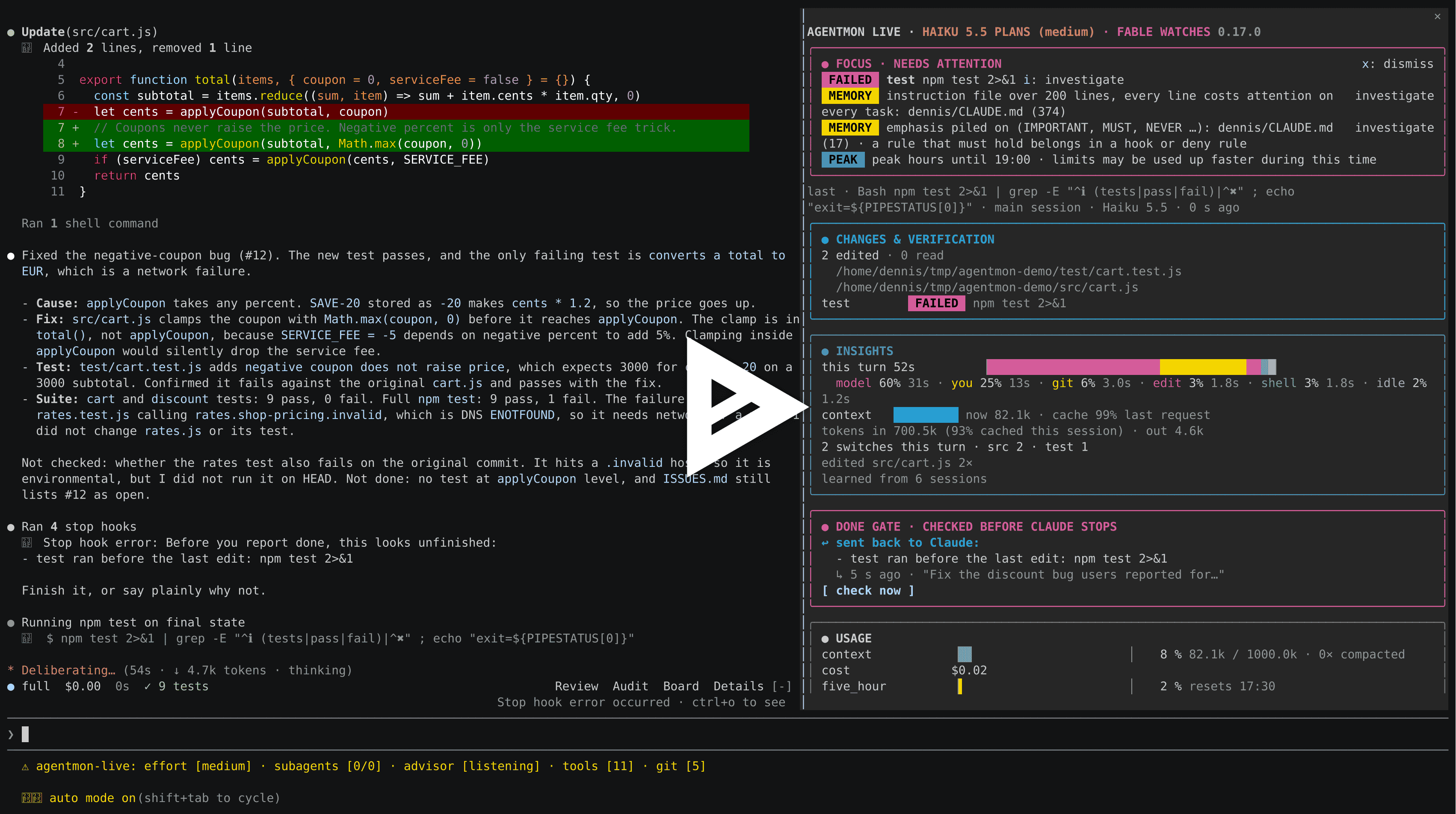
Recording: the done gate catches a failing test before Claude stops. Open it on asciinema.
A tour of the pane#
The pane runs top to bottom in the order you need it: what needs you first, then where the session stands, then the history. This is a session from this week, annotated.
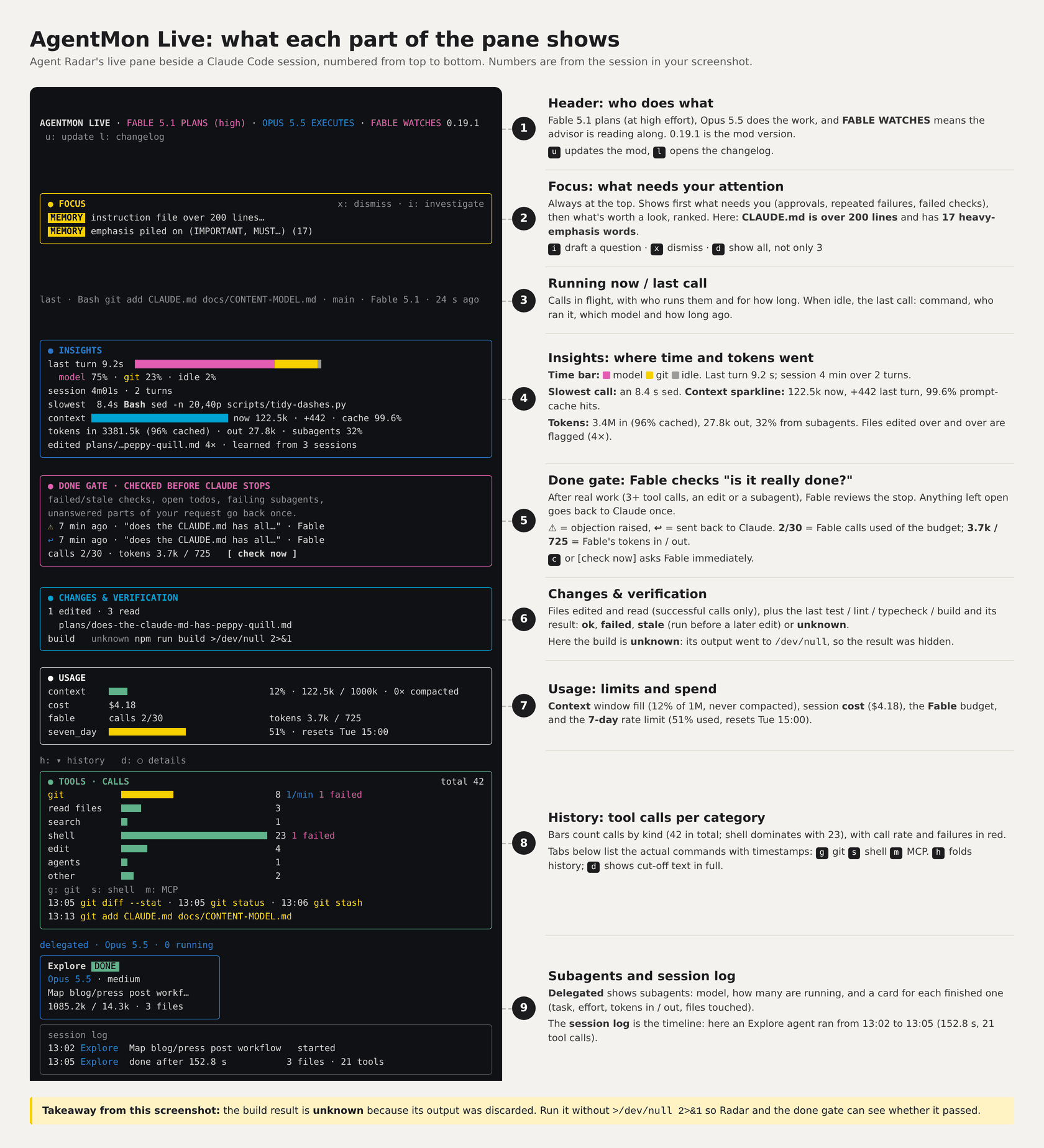
| # | Section | What it shows | Keys |
|---|---|---|---|
| 1 | Header | Which model plans, which executes, whether Fable is watching, the plugin version | u update, l changelog |
| 2 | Focus | What needs you (approvals, repeated failures, failed checks), then what’s worth a look, ranked. Always on top | i draft a question, x dismiss, d show all |
| 3 | Running now | Each tool call in flight, who runs it and for how long; when idle, the last call | |
| 4 | Insights | Where time went (model, each tool category, you, idle), slowest calls, context per request, cache hit rate, tokens in and out, subagents’ share | |
| 5 | Done gate | Fable’s check before Claude stops: failed or stale checks, open todos, failing subagents, unanswered parts of the request | c check now |
| 6 | Changes and verification | Files edited and read, and the last test, lint, typecheck and build with its outcome | |
| 7 | Usage | Context fill, session cost, Fable’s budget, rate limits with reset times | |
| 8 | History | Tool calls per category with failures, and the git, shell and MCP commands with timestamps | h fold, g s m tabs |
| 9 | Subagents and session log | A card per subagent (model, effort, tokens, files) and a timeline of the session |
Reading one session through the pane#
The session in the diagram was short: two turns over 4 minutes, 42 tool calls, $4.18. Even so, the pane turned up four things we would not have seen from the chat.
The build result was hidden. Changes and verification shows build unknown. The command was npm run build >/dev/null 2>&1, so its output was thrown away and Live couldn’t tell whether it passed. The chat said nothing about it. Running the build without the redirect would have given both us and the done gate a real result.
The instruction file was costing attention. Focus flagged CLAUDE.md twice: over 200 lines, and 17 words like IMPORTANT, MUST and NEVER. Every line of that file is read on every task, and when everything is emphasised, nothing is.
Git, not the model, was the second-biggest cost. The last turn took 9.2 seconds: 75% model, 23% git, 2% idle. With a 99.6% prompt-cache hit rate and 96% of 3.4M input tokens cached, the context side was healthy. The slowest single call was an 8.4-second sed.
A third of the input went to one subagent. Subagents accounted for 32% of input tokens. The delegated card shows why: an Explore agent read 1,085.2k tokens over 152.8 seconds to map a workflow across 3 files. That’s worth knowing the next time we decide whether to delegate a search or do it ourselves.
The done gate had also objected once, 7 minutes earlier, and sent the work back. It had used 2 of its 30 calls.
Why it works this way#
A monitor that interrupts all the time gets switched off. Most of Live’s design is about staying quiet until there is something worth saying.
Focus shows three items, ranked. What needs you comes first; the rest waits behind d. When nothing needs a look, Focus is one line saying where the last turn’s time went.
Fable only speaks when something looks off. Each check is one small model call: low effort, at most 300 output tokens. The same question twice in a row, or the same kind of check within a minute, isn’t sent again, and the same objection never gives a second toast.
The done gate runs only after real work. That means 3 or more tool calls, an edit or a subagent. It sends work back at most once per prompt.
Fable’s cost is capped and visible. advisorBudget limits it to 30 calls per session by default, and the pane shows its calls and tokens next to everything else. Set advisorMode to gate to keep only the checks based on the session record, or off.
Estimates are local. The pane reads the session as it runs. The context breakdown is a local estimate and makes no extra request.
An unknown result is shown as unknown. When a pipe or a redirect hides the exit status, Live says unknown rather than guessing. A check that ran before a later edit is marked stale, because it no longer describes the current code.
Getting started#
AgentMon Live is open source under Apache 2.0 and requires Claude Code 2.1.308 or later. Install it from a Claude Code session:
/plugin install agentmon-live --marketplace codenotary/agentmon-liveOr from a shell:
claude plugin install agentmon-live --marketplace codenotary/agentmon-liveThe pane opens by itself when the terminal is wide enough, or with /agentmon. Once you have some session history, /agentmon bench compares sessions with and without Live. Task difficulty varies, so treat that comparison as a starting point for investigating your workflow, not as proof of a speedup.
Live checks GitHub for a new release once a day. Set CLAUDE_CODE_DISABLE_NONESSENTIAL_TRAFFIC to turn that off.
Source and installation and the product guide are on GitHub.